SaaS
B2B
B2C
Mobile Design
Desktop Design
A centralized support platform that streamlines communication and ticket management between admins and employees.
Client: Ubeya
Help Desk
The Problem
Users relied on external platforms to resolve issues.
As Ubeya scaled, its chat experience struggled to support growing employees needs, leading users to rely on email, WhatsApp and other platforms causing fragmented communication, lost context, and slower resolution. This reduced adoption of Ubeya’s built-in tools and limited the overall value and efficiency of the platform.
The Goal
Improve Communication
Improve admin-employee communication with a structured support workflow that enables faster resolution, clear ownership, and better visibility throughout the request lifecycle.
Increase Retention
Improve user retention by reducing reliance on external tools and strengthening product adoption, while creating a more seamless support experience.
Personas
Responsible for managing employee requests, coordinating responses, assigning ownership, and ensuring issues are resolved efficiently.
Goals
• Centralize employee communication in one place.
• Track and manage requests without losing important information.
• Assign ownership and ensure accountability across teams.
• Follow up efficiently until issues are resolved.
Pain Points
• Messages get lost.
• No ownership or accountability.
• Hard to track and follow up.
• Losing employee messages.
• Difficulty tracking ownership (who is responsible for what).
Admin

Alex, 42
Goals
• Report issues easily through a structured process.
• Receive faster responses and solutions
• Track request progress without needing additional follow-ups.
• Keep personal channels separate from work-related communication.
Pain Points
• No structured way to report issues.
• Lack of visibility on request status.
• Mixing personal communication channels with work-related discussions.
• Lack of a structured way to report issues.
Employees who need assistance and submit requests when they encounter issues, requiring a simple and transparent way to communicate with support teams.
Employee

Anna, 19
The Solution
a Centralized Support Experience
A centralized Help Desk that brings conversations, business context, and support tools together in one place. This enabled teams to manage, resolve, and track support requests within the platform, while increasing feature adoption and creating a more scalable support experience.
The Approach
Analyze Existing Communication Platforms
Explored the platforms users were already relying on, such as WhatsApp, email and customer support tools, to understand why they preferred them over the existing chat solution. By identifying the features, workflows, and interaction patterns that made these platforms successful, I was able to uncover opportunities and apply those insights to the Help Desk experience.
Evaluate the Existing Chat Experience Within Ubeya
Analyzed the current chat feature to identify usability gaps, missing functionality, and workflow limitations that prevented users from managing support requests effectively. By understanding what wasn't working, I defined the key improvements needed to transform a basic chat into a structured Help Desk experience.
Define the Information Needed to Take Action
Identified the key platform data that should be embedded into each ticket, giving admins the full context they need to understand, prioritize, and resolve issues quickly.
Main User Flow
Admin receives a ticket submitted by an employee

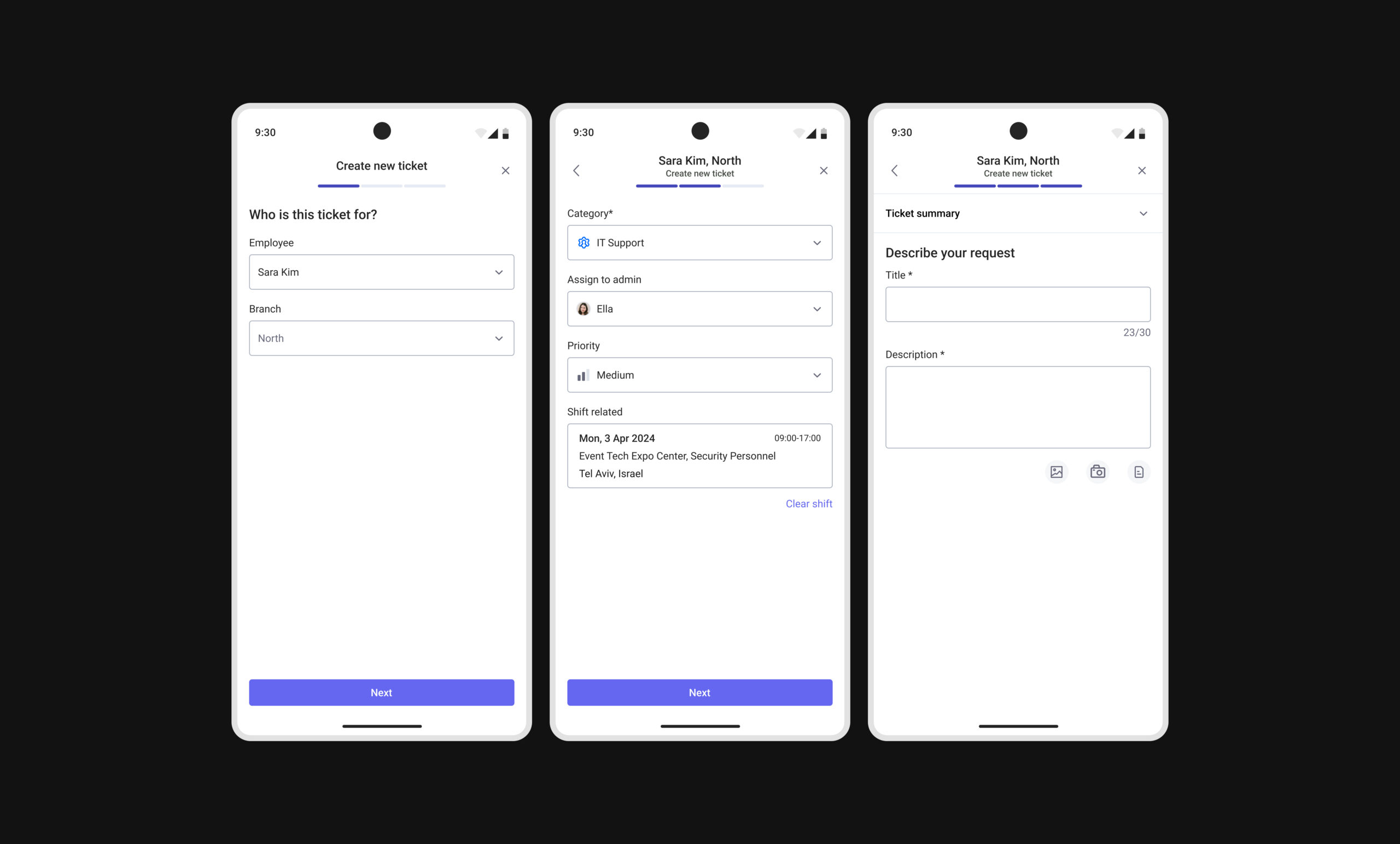
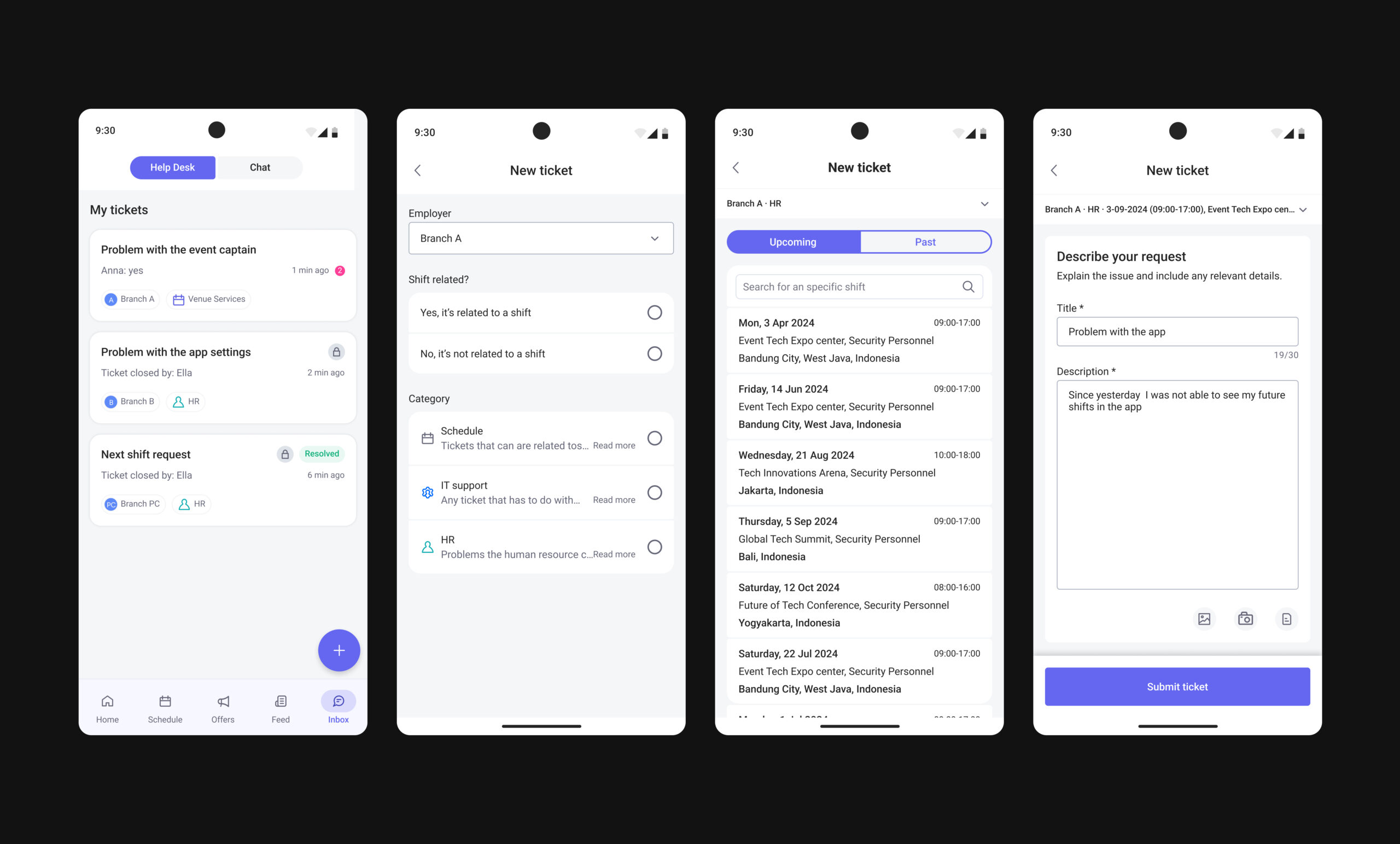
An employee creates a ticket for an admin

User Testing
User Testing Session
Turning user feedback into insights and improvements for the next iteration.
We tested the Help Desk experience with users to validate the overall usability and effectiveness of the new workflow.
Users found the experience intuitive and easy to navigate, especially the ticket creation process and the way relevant background information was displayed to provide a clear understanding of each issue.
The structured workflow and centralized context helped users quickly understand the purpose of each ticket and manage requests more efficiently.
The sessions also revealed small improvement opportunities and missing edge cases, which guided further refinements in the next iteration.
Challenge Based on the User Research Testing
Previously, clicking "Resolve Ticket" immediately closed the ticket, creating challenges.
• Employees had no way to confirm the solution or request further assistance.
• If the issue remained unresolved, they had to create a new ticket, causing fragmented communication and loss of context.
• Admins often followed up manually with employees to confirm whether the issue was resolved and if any further help was needed. During this process, the ticket remained in the Open Tickets folder, which was designed to organize the admin workspace and highlight tickets that still required attention.
• As a result, resolved or nearly resolved tickets continued appearing alongside active requests, creating visual clutter and reducing focus on relevant tasks.
Solution Based on the User Testing
The solution was to introduce a confirmation step before closing a ticket.
Instead of immediately resolving the ticket, employees are presented with a confirmation message, allowing them to validate the solution before the ticket is permanently closed.
• Involves employees in the decision-making process by allowing them to confirm that their issue has been properly addressed before closure.
• Reduces prematurely closed tickets and improves accuracy throughout the resolution process.
• Creates a clear validation step between resolving and closing a ticket, resulting in a smoother workflow.
• Introduces a dedicated Resolved folder to separate completed tickets from active ones and keep the ticket table organized.
• Improves ticket visibility and admin efficiency by reducing clutter, focusing attention on active issues, and preserving access to past resolutions.
Employee App: Create a Ticket
Admin App: Create a Ticket